


Formula Calculation
The calculation formula feature enables users to calculate form component values through formulas, providing more powerful dynamic calculation and data processing capabilities, including the following operations:
1. Overview
In form logic design, calculation formulas are a powerful dynamic rule engine that allows developers or business personnel to process form data in real-time through function formulas and set conditional rules based on calculation results (such as field show/hide, required/disabled, value validation, etc.). Its core functionality covers numeric operations, text processing, time calculations, collection operations, and logical judgments, meeting dynamic interaction needs in complex business scenarios.
2. Configuration
Using calculation formulas is similar to using Excel function formulas, supporting calculations using fields already added to the form.
Example: The form has contract amount and received amount fields, and needs to calculate the unpaid amount based on these two fields.
Step 1: First select the SUM function formula for calculation, click the function to insert the function formula into the right content area;
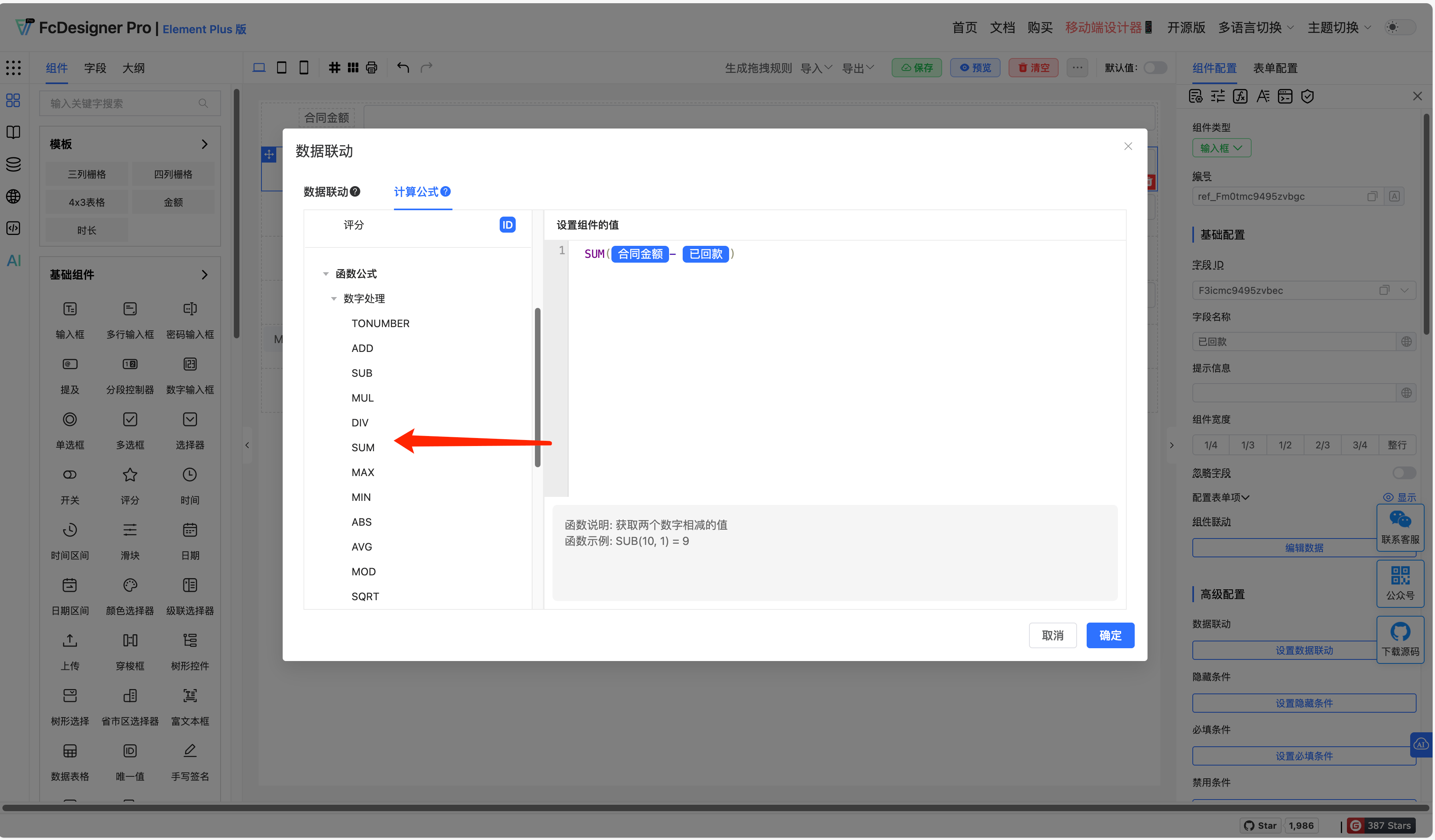
Step 2: Select the contract amount and received amount fields, and manually type the - sign. A simple calculation formula is now complete!
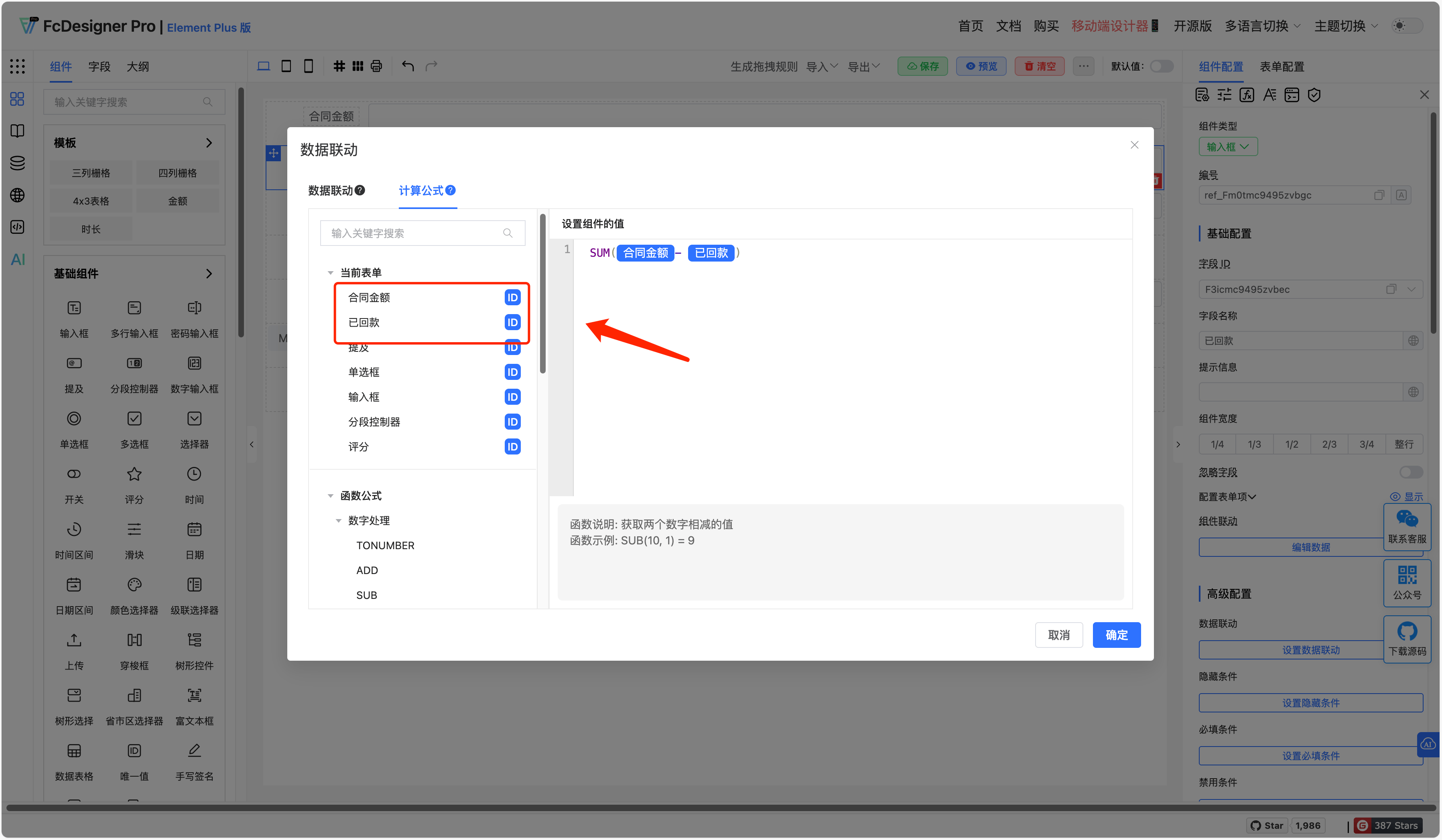
You can create more complex formulas using the same approach.
3. How to View Function Descriptions
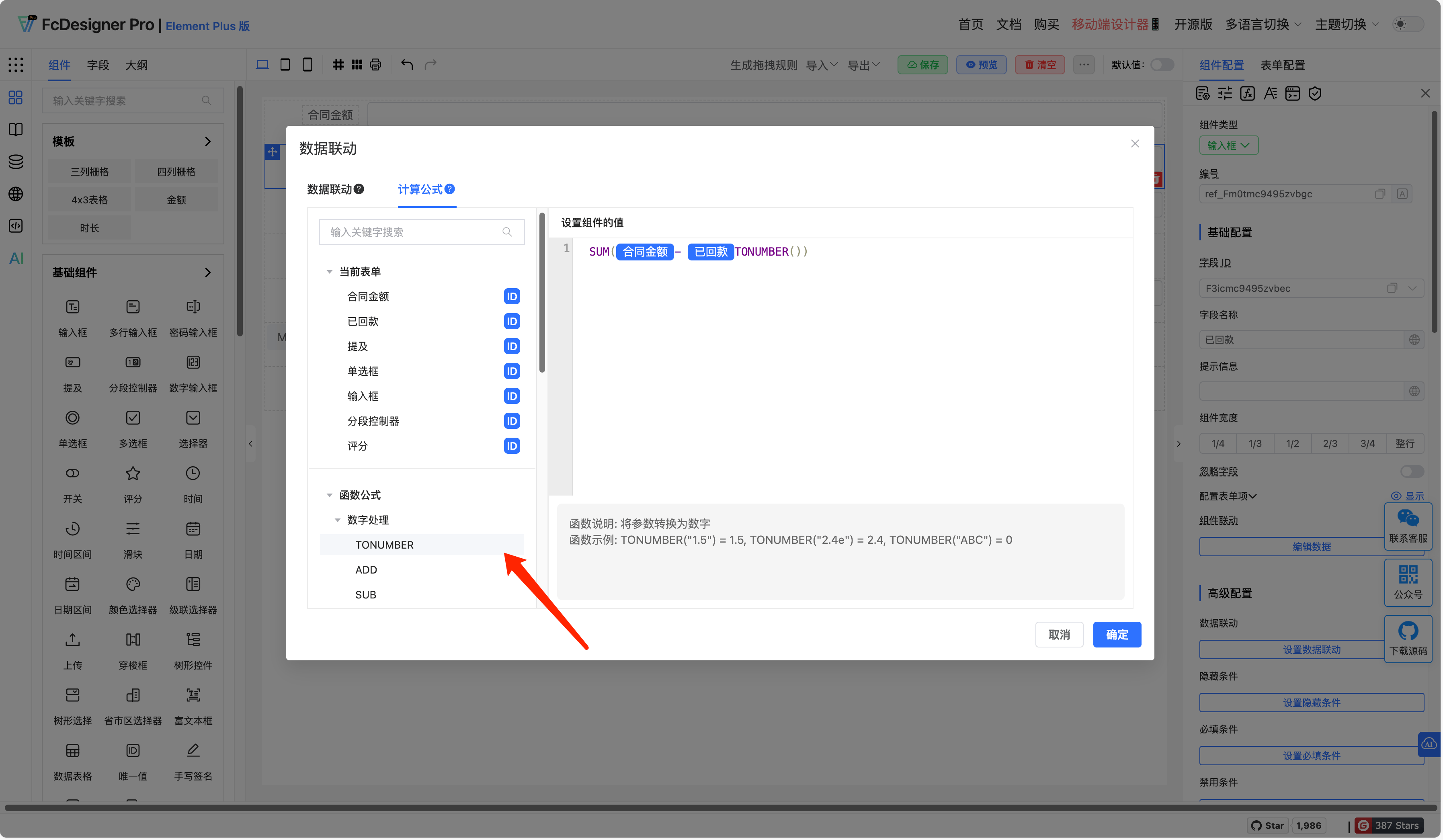
When hovering the mouse over a function, you can view the function description and example.
4. Function Reference
| Function Name | Description | Example |
|---|---|---|
| TONUMBER | Convert parameter to number | TONUMBER("1.5") = 1.5, TONUMBER("2.4e") = 2.4, TONUMBER("ABC") = 0 |
| ADD | Get the sum of two numbers | ADD(1, 2) = 3 |
| SUB | Get the difference of two numbers | SUB(10, 1) = 9 |
| MUL | Get the product of two numbers | MUL(2, 2) = 4 |
| DIV | Get the quotient of two numbers | DIV(10, 2) = 5 |
| SUM | Get the sum of values in a collection | SUM(1,2,3) = 6, SUM([5, 6, 7]) = 18 |
| MAX | Get the maximum value in parameter list | MAX(1, 5, 10) = 10 |
| MIN | Get the minimum value in parameter list | MIN(1, 5, 10) = 1 |
| ABS | Get the absolute value of a number | SUM(1,2,3) = 6, SUM([5, 6, 7]) = 18 |
| AVG | Get the average of parameter list | Get the average of parameter list |
| MOD | Get the remainder of two numbers | MOD(10, 3) = 1 |
| SQRT | Get the positive square root of a number | SQRT(9) = 3 |
| POWER | Get the power of a specified number | POWER(2, 4) = 16 |
| RAND | Round a decimal to specified digits | RAND() = 0.75348173001531 |
| PI | Get pi | PI() = 3.141592653589793 |
| ROUND | Round a decimal to specified digits | ROUND(3.149, 2) = 3.15, ROUND(3.149) = 3 |
| FLOOR | Get the floor value of a specified number | FLOOR(1.93) = 1 |
| CEIL | Get the ceiling value of a specified number | CEIL(1.93) = 2 |
| FIXED | Keep a decimal to specified decimal places | FIXED(1.93, 1) = 1.9 |
| TOCHINSESAMOUNT | Get the Chinese uppercase amount of a specified number | TOCHINSESAMOUNT(32.14) = "叁拾贰元壹角肆分" |
| test | Example of extended custom calculation function | test(val) == !!val |
| STARTSWITH | Check if string starts with specified string | STARTSWITH("ABCDEF","ABC") = true, STARTSWITH("ABCDEF","AD") = false |
| SLICELEFT | Get a string of specified length from the start | SLICELEFT("ABCDE", 3) = "ABC" |
| SLICERIGHT | Get a string of specified length from the end | SLICERIGHT("ABCDE", 3) = "CDE" |
| TOLOWER | Convert all uppercase letters in string to lowercase | TOUPPER("ABCD") = "abcd" |
| TOUPPER | Convert all lowercase letters in string to uppercase | TOUPPER("abcd") = "ABCD" |
| INCLUDES | Check if string contains specified string | INCLUDES("ABCD", "BC") = 1, INCLUDES("ABCD", "E") = -1 |
| CONCAT | Concatenate all parameters, return concatenated string | CONCAT("ABC", "DEF") = "ABCDEF" |
| REPLACE | Replace part of text in string with different text, only replace first match | REPLACE("AbAc","A","1") = "1bAc" |
| REPLACEALL | Replace part of text in string with different text, replace all matches | REPLACEALL("AbAc","A","1") = "1b1c" |
| TRIM | Remove spaces before and after string | TRIM("\t\n A BC \t\n") = "A BC" |
| NOW | Get current time | NOW() = "2024-03-15 12:08:31" |
| TODAY | Get today's date | TODAY() = "2024-03-15" |
| YEAR | Get year of specified date | YEAR("2024-03-15 12:08:31") = 2024 |
| MONTH | Get month of specified date | SUBYEAR("2024-03-15 12:08:31", 2) = 2022-03-15 12:08:31, SUBYEAR("2024-03-15 12:08:31", 3, "YYYY-MM-DD") = 2021-03-15 |
| DAY | Get day of specified date | SUBYEAR("2024-03-15 12:08:31", 2) = 2022-03-15 12:08:31, SUBYEAR("2024-03-15 12:08:31", 3, "YYYY-MM-DD") = 2021-03-15 |
| HOUR | Get hour of specified date | HOUR("2024-03-15 12:08:31") = 12 |
| MINUTE | Get minute of specified date | MINUTE("2024-03-15 12:08:31") = 8 |
| SECOND | Get second of specified date | SECOND("2024-03-15 12:08:31") = 31 |
| ADDYEAR | Add years to specified date | ADDYEAR("2024-03-15 12:08:31", 2) = 2026-03-15 12:08:31, ADDYEAR("2024-03-15 12:08:31", 3, "YYYY-MM-DD") = 2027-03-15 |
| SUBYEAR | Subtract years from specified date | SUBYEAR("2024-03-15 12:08:31", 2) = 2022-03-15 12:08:31, SUBYEAR("2024-03-15 12:08:31", 3, "YYYY-MM-DD") = 2021-03-15 |
| ADDMONTH | Add months to specified date | ADDMONTH("2024-03-15 12:08:31", 2) = 2024-05-15 12:08:31, ADDMONTH("2024-03-15 12:08:31", 10, "YYYY-MM-DD") = 2025-01-15 |
| SUBWEEK | Subtract weeks from specified date | SUBWEEK("2024-03-15 12:08:31", 2) = 2024-03-01 12:08:31, SUBWEEK("2024-03-15 12:08:31", 4, "YYYY-MM-DD") = 2024-02-16 |
| ADDMINUTE | Add minutes to specified time | ADDMINUTE("2024-03-15 12:08:31", 30) = 2024-03-15 12:38:31, ADDMINUTE("2024-03-15 12:08:31", 55, "HH:mm:ss") = 13:03:31 |
| SUBMINUTE | Subtract minutes from specified time | SUBMINUTE("2024-03-15 12:08:31", 30) = 2024-03-15 11:38:31, SUBMINUTE("2024-03-15 12:08:31", 55, "HH:mm:ss") = 11:13:31 |
| ADDSECOND | Add seconds to specified time | ADDSECOND("2024-03-15 12:08:31", 20) = 2024-03-15 12:08:51, ADDSECOND("2024-03-15 12:08:31", 40, "HH:mm:ss") = 12:09:11 |
| SUBSECOND | Subtract seconds from specified time | SUBSECOND("2024-03-15 12:08:31", 20) = 2024-03-15 12:08:11, SUBSECOND("2024-03-15 12:08:31", 40, "HH:mm:ss") = 12:07:51 |
| DIFFDAYS | Get the number of days between two dates | DIFFDAYS("2024-01-15","2024-03-15") = 60 |
| DIFFHOURS | Get the number of hours between two times, keep two decimal places | DIFFHOURS("2024-01-15 12:00:00", "2024-01-16 15:00:00") = 27, DIFFHOURS("2024-01-15 12:00:00", "2024-01-15 12:30:00") = 0.5 |
| DIFFMINUTES | Get the number of minutes between two times | DIFFMINUTES("2024-01-15 12:00:00", "2024-01-15 12:30:00") = 30 |
| TIMESTAMP | Get timestamp of specified date | TIMESTAMP("2024-03-15 12:08:31") = 1710475711000 |
| IN | Check if second parameter is in collection | IN([1,2,3,4], 4) = true, IN([1,2,3,4], 5) = false |
| LEN | Get length of specified collection | LEN(["a", "b", "c"]) = 3 |
| UNION | Remove duplicates from collection/parameters, return deduplicated collection | UNION(1, 3, 5, 1, 4, 3) = [1, 3, 5, 4], UNION([1, 2, 3, 1, 2, 3]) = [1, 2, 3] |
| COLUMN | Get specified field from sub-form and return collection | COLUMN([{key: 1}, {key: 2}, {key: 3}],"key") = [1, 2, 3], COLUMN([[{key: 1}, {key: 2}], [{key: 3}, {key: 4}]], "key") = [1, 2, 3, 4] |
| VALUE | Get specified field from grouped form | VALUE({key: 1}, "key", 2) = 1, VALUE({key: 1}, "value", 2) = 2, VALUE({list: {key: 1}}, "list.key") = 1 |
| INTERSECTIONSET | Get intersection of two sets | INTERSECTIONSET([1, 3, 5], [1, 4, 3]) = [1, 3] |
| LIST | Get collection of all parameters | LIST([1, 3, 5], [1, 4, 3]) = [[1, 3, 5], [1, 4, 3]] |
| IF | Check if a condition is met, if yes return second parameter, otherwise return third parameter | IF(false, 1, 0) = 0, IF(true, 1, 0) = 1 |
| AND | Link expressions with "and", return true when all expressions are true, otherwise return false | AND(true, true) = true, AND(true, false) = false |
| OR | Link expressions with "or", return true when one expression is true, otherwise return false | OR(false, false) = false, OR(false, true) = true |
| CASE | Check if one or more conditions are met, return value of first met condition | CASE(IN([1,2,3,4], 5), 1, IN([1,2,3,4], 2), 2) = 2 |
| NOT | Get opposite value of a logical value | NOT(true) = false, NOT(false) = true |
| EQ | Check if two values are equal | EQ(100, 100) = true, EQ(100, 90) = false, EQ(100, "100") = false |
| NE | Check if two values are not equal | NE(100, 90) = true, NE(100, 100) = false, NE(100, "100") = true |
| GE | Check if first value is greater than or equal to another value | GE(100, 90) = true, GE(100, 100) = true, GE(100, 110) = false |
| GT | Check if first value is greater than another value | GT(100, 90) = true, GT(100, 100) = false, GT(100, 110) = false |
| LE | Check if first value is less than or equal to another value | LE(100, 90) = false, LE(100, 100) = true, LE(100, 110) = true |
| LT | Check if first value is less than another value | LT(100, 90) = false, LT(100, 100) = false, LT(100, 110) = true |
| TRUE | Return logical value true | TRUE() = true |
| FALSE | Return logical value false | FALSE() = false |
| DEFAULT | Check first parameter, if empty return second parameter, otherwise return first parameter | DEFAULT("#FF7271", "#000") = "#FF7271", DEFAULT("", "#000") = "", DEFAULT(null, "#000") = "#000" |
| EMPTY | Check if parameter is empty | EMPTY("") = true, EMPTY([]) = true, EMPTY("0") = false |
| NOTEMPTY | Check if parameter is not empty | NOTEMPTY("") = false, NOTEMPTY([]) = false, NOTEMPTY("0") = true |
| ISNUMBER | Check if parameter is a number | ISNUMBER("2.34") = true, ISNUMBER("2.4e") = false |