


Extend Configuration Rules
Use the baseRule, formRule, componentRule, and appendConfigData config parameters to extend and customize component configuration rules. These parameters let you adjust the designer's configuration options to fit your specific business needs.
Extend Form Configuration
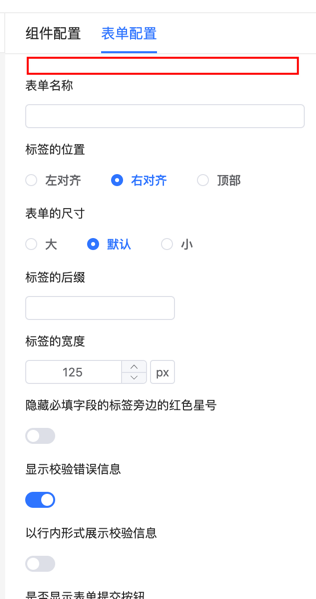
Add a remark input box at the top of the form configuration to help users configure additional information or descriptions when creating forms. The entered value is saved in options.mark:
<template>
    <fc-designer ref="designer" :config="config"/>
</template>
<script setup>
    const config = {
        appendConfigData: ['formCreateMark'],
        formRule: {
            prepend: true,
            // append: true, // Add to the bottom
            rule() {
                return [
                    {
                        type: 'input',
                        // Configuration name, modifies options.mark
                        field: 'formCreateMark',
                        title: 'Form Remark'
                    }
                ]
            }
        }
    }
</script>
View built-in form components and configurable parameters in the Renderer Documentation.
Form Configuration Name Mapping Rules
If field starts with formCreate in the component configuration rule method, the system automatically maps it to the corresponding field in the rule.
| Field | Description |
|---|---|
| formCreateForm>labelWidth | Modifies the options.form.labelWidth field |
| formCreateMark | Modifies the options.mark field |
Extend Form Component Configuration
Note
When adding new configurations, list all the field fields of all configuration items in appendConfigData.
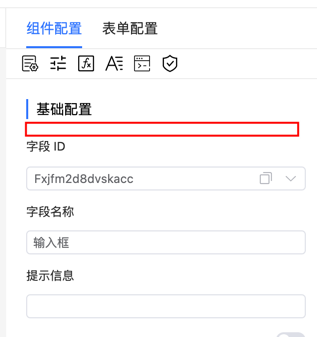
Add a field mapping input box at the top of the form component configuration:
<template>
    <fc-designer ref="designer" :config="config"/>
</template>
<script setup>
    const config = {
        appendConfigData: ['formCreateMark'],
        // Add to all form components
        baseRule: {
            prepend: true,
            // append: true, // Add to the bottom
            rule() {
                return [
                    {
                        type: 'input',
                        // Configuration name, modifies rule.mark
                        field: 'formCreateMark',
                        title: 'Component Remark'
                    }
                ]
            }
        }
    }
</script>
View built-in form components and configurable parameters in the Renderer Documentation.
Extend Component Configuration
Note
When adding new configurations, list all the field fields of all configuration items in appendConfigData.
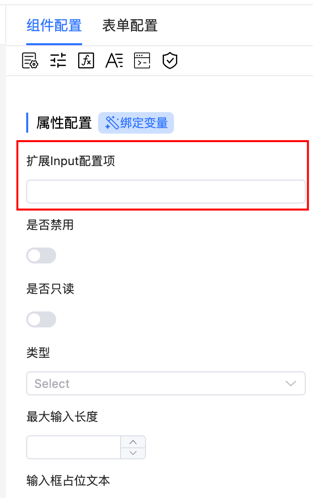
Add custom configurations at the top of the input component configuration items:
<template>
    <fc-designer ref="designer" :config="config"/>
</template>
<script setup>
    const config = {
        appendConfigData: ['formCreateDbField', 'formCreateProps>mark', 'formCreateDescription'],
        componentRule: {
            // Add to all components
            default: {
                prepend: true,
                // append: true, // Add to the bottom
                rule() {
                    return [
                        {
                            type: 'input',
                            field: 'formCreateDbField',
                            title: 'Data Field'
                        }
                    ]
                }
            },
            // Add separately to components with drag rule `input`
            input: {
                prepend: true,
                // append: true, // Add to the bottom
                rule() {
                    return [
                        {
                            type: 'input',
                            field: 'formCreateProps>mark',
                            title: 'Remark',
                            inject: true,
                            on: {
                                change(inject, value) {
                                    const description = inject.api.getRule('formCreateDescription');
                                    const activeRule = inject.api.activeRule; // Currently selected component rule
                                    // Automatically fill description content when description is empty
                                    if(!description.value) {
                                        description.value = value;
                                        activeRule.description = value;
                                    }
                                },
                            }
                        },
                        {
                            type: 'input',
                            title: 'Description',
                            field: 'formCreateDescription',
                        },
                    ]
                }
            }
        }
    }
</script>
View built-in form components and configurable parameters in the Renderer Documentation.
Component Configuration Name Mapping Rules
If field starts with formCreate in the component configuration rule method, the system automatically maps it to the corresponding field in the rule.
| Field | Description |
|---|---|
| formCreateProps>labelWidth | Modifies the rule.props.labelWidth field |
| formCreateMark | Modifies the rule.mark field |
| formCreateChild | Modifies rule.children[0] |
Data Structure
// Define a function that returns rules or returns rules through the rule field
type extendRule = ((arg: { t: t }) => Rule[]) | {
    // Generate rules
    rule: (arg: { t: t }) => Rule[];
    // Append
    append?: boolean;
    // Prepend
    prepend?: boolean;
};
type Config = {
    // Rendering rules for base configuration, can override default rules. When append is true, append after default rules
    baseRule?: extendRule;
    // Rendering rules for form, can override default rules. When append is true, append after default rules
    formRule?: extendRule;
    // Rendering rules for component configuration, can override default rules. When append is true, append after default rules
    componentRule?: {
        // Applies to all components
        default: (rule: Rule, arg: { t: t }) => Rule[] | {
            rule: (rule: Rule, arg: { t: t }) => Rule[];
            append?: boolean;
            prepend?: boolean;
        };
        // id is the id of the component drag rule, rule is the generation rule of the current component
        [id: string]: (rule: Rule, arg: { t: t }) => Rule[] | {
            rule: (rule: Rule, arg: { t: t }) => Rule[],
            append?: boolean
            prepend?: boolean;
        }
    };
}