


Mobile Adaptation
FcDesigner supports rendering ElementPlus / AntDesignVue form rules designed on PC as VantUI-style forms on mobile, providing a consistent user experience and ensuring good display on different devices.
This feature is only available in the Pro version of the designer. Learn more about Pro version features
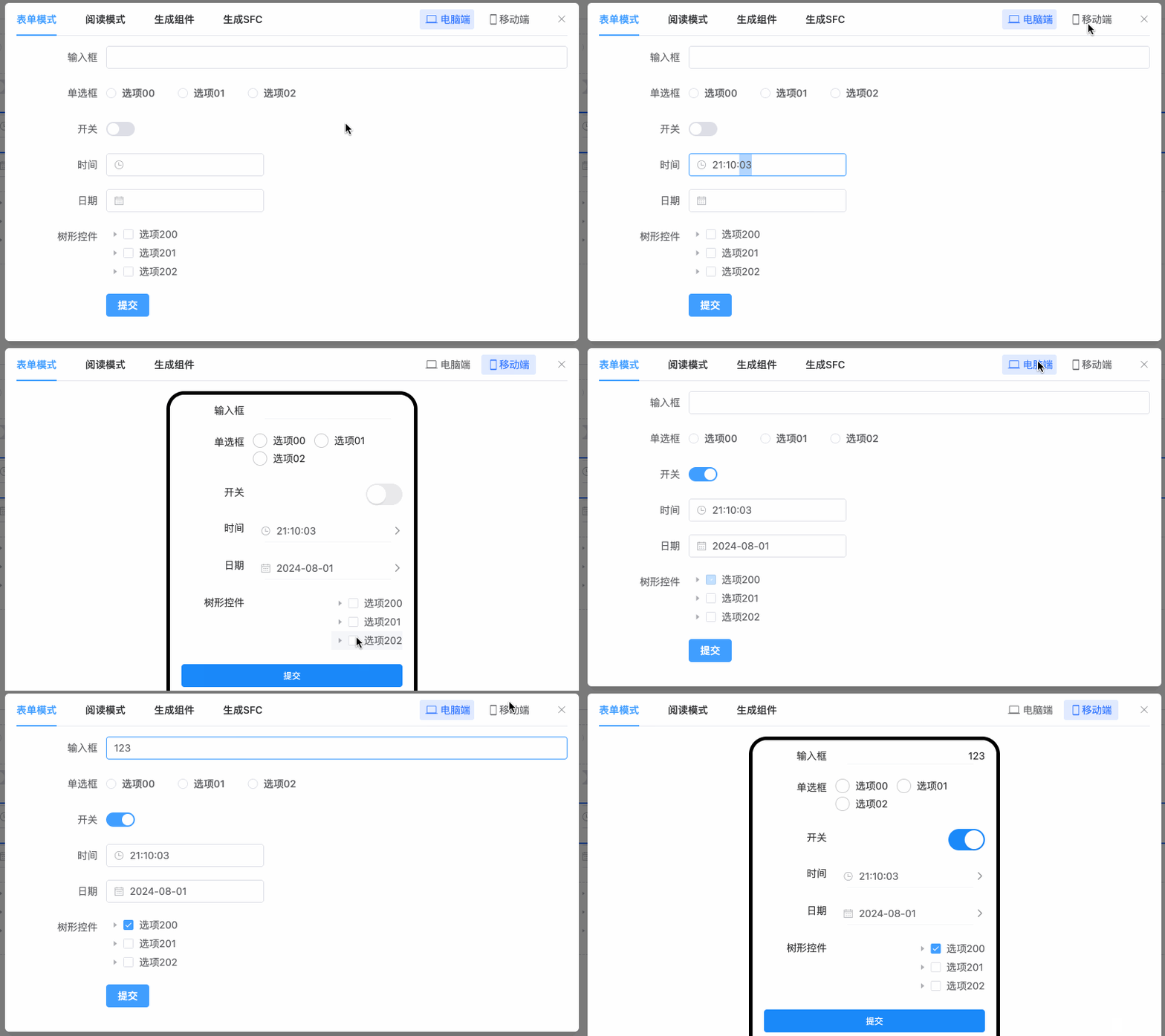
Feature Overview
Mobile adaptation ensures consistent form display across different devices. Forms automatically adjust styles and layouts based on device type. Mobile forms use Vant-style components to optimize display and interaction on small screens.
Note
The current mobile adaptation feature only supports some basic form components and layout components, and doesn't yet cover all component types.
Usage
1. Install and Load Components
First, import the mobile-specific renderer dist/render/vant/form-create.[es|umd].js in your project. If you place the Pro version in a different location, adjust accordingly:
- import formCreateMobile from "@form-create/vant";
+ import formCreateMobile from "./fcDesignerPro/dist/render/vant/form-create.es";
2. Render Mobile Form
In Vue components, use the form-create-mobile component to render forms. This component automatically renders in appropriate styles based on device type:
<template>
    <!-- Element Plus version uses driver="elm", Ant Design Vue version uses driver="antd" -->
    <form-create-mobile
    driver="elm"
    v-model="formData"
    v-model:api="fapi"
    :rule="rule"
    :option="option"
    @submit="onSubmit"
    ></form-create-mobile>
</template>
Important Reminder
Must correctly configure driver property: When rendering on mobile, correctly set the driver property according to the UI framework you use. This is a key configuration to ensure correct rendering as Vant UI style.
- ✅ Element Plus version:
driver="elm"- renders as Vant UI style - ✅ Ant Design Vue version:
driver="antd"- renders as Vant UI style - ❌ Error: Not setting driver - may cause rendering failure
- ❌ Error: driver configuration doesn't match the UI framework used - may cause style anomalies
<script setup>
    import { ref } from 'vue';
    import formCreateMobile from "./fcDesignerPro/dist/render/vant/form-create.es";
    const formData = ref({});
    const fapi = ref({});
    // Load JSON data
    const rule = ref(formCreateMobile.parseJson('/*json*/'));
    const option = ref(formCreateMobile.parseJson('/*json*/'));
    function onSubmit(data) {
        console.log('Form submitted:', data);
    }
</script>
Component Adaptation
Mount components with the same functionality but different UIs on different ends. The business layer uses a unified component interface, and the underlying layer automatically selects the corresponding UI implementation based on the runtime environment.
Suppose there is currently a custom UnifiedSelect business component based on ElementUI:
<template>
  <!-- Element UI 版本 -->
  <el-select
    v-model="innerValue"
    :placeholder="placeholder"
    :disabled="disabled"
    :clearable="clearable"
    :multiple="multiple"
    @change="handleChange"
  >
    <el-option
      v-for="item in options"
      :key="item.value"
      :label="item.label"
      :value="item.value"
    />
  </el-select>
</template>

<script>
export default {
  name: 'UnifiedSelect',
  props: {
    value: [String, Number, Array],
    options: {
      type: Array,
      default: () => []
    },
    placeholder: String,
    disabled: Boolean,
    clearable: Boolean,
    multiple: Boolean,
  },
  data() {
    return {
      innerValue: this.value,
      showPicker: false,
      selectedLabel: ''
    }
  },
  watch: {
    value(newVal) {
      this.innerValue = newVal
    }
  },
  methods: {
    handleChange(value) {
      this.$emit('input', value)
      this.$emit('change', value)
    },
  }
}
</script>
(Vant UI Implementation)
To implement mobile adaptation, create a component with the same functionality and name, and mount it when rendering on mobile:
<template>
  <!-- Vant UI 版本 -->
  <van-field
    v-model="selectedLabel"
    readonly
    :placeholder="placeholder"
    :disabled="disabled"
    @click="showPicker = true"
  />
  <van-popup v-model="showPicker" round position="bottom">
    <van-picker
      :columns="pickerOptions"
      @confirm="handleVantConfirm"
      @cancel="showPicker = false"
    />
  </van-popup>
</template>

<script>
export default {
  name: 'UnifiedSelect',
  props: {
    value: [String, Number, Array],
    options: {
      type: Array,
      default: () => []
    },
    placeholder: String,
    disabled: Boolean,
    clearable: Boolean,
    multiple: Boolean,
  },
  data() {
    return {
      innerValue: this.value,
      showPicker: false,
      selectedLabel: ''
    }
  },
  computed: {
    pickerOptions() {
      return this.options.map(item => ({
        text: item.label,
        value: item.value
      }))
    }
  },
  watch: {
    value(newVal) {
      this.innerValue = newVal
      this.updateSelectedLabel()
    },
    options() {
      this.updateSelectedLabel()
    }
  },
  methods: {
    handleChange(value) {
      this.$emit('input', value)
      this.$emit('change', value)
    },
    handleVantConfirm(value) {
      this.innerValue = value.value
      this.handleChange(value.value)
      this.showPicker = false
    },
    updateSelectedLabel() {
      const selected = this.options.find(item => item.value === this.innerValue)
      this.selectedLabel = selected ? selected.label : ''
    }
  }
}
</script>
Mount the Component on Mobile
Use the formCreateMobile.component method to mount custom components on mobile:
formCreateMobile.component('UnifiedSelect', UnifiedSelect);Driver Configuration
According to the UI framework used in your project, correctly configure the driver property:
Element Plus Project
<form-create-mobile driver="elm" />Ant Design Vue Project
<form-create-mobile driver="antd" />Configuration Points
- Element Plus Project: Use
driver="elm" - Ant Design Vue Project: Use
driver="antd" - Both configurations will render as Vant UI style on mobile
- Incorrect configuration may cause component rendering anomalies
Through FcDesigner's mobile adaptation functionality, you can easily achieve cross-platform form display. Mobile uses Vant components to optimize display effects while ensuring both PC and mobile can get a consistent and good user experience.