


Extend Fonts
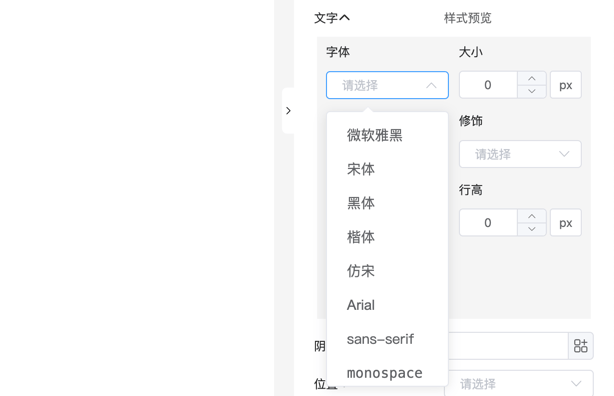
Use config.fontFamily to customize the font selection list in the designer style panel.
Data Structure
ts
type Config = {
    // Extend fonts
    fontFamily?: Array<string | {label: string, value: string}>;
}
Note
Font names must comply with CSS font-family specifications. When using custom fonts, ensure the user environment supports them or provide a font loading solution.
Basic Configuration Example
Simple String Array
Provide a predefined list of font families for the form designer:
vue
<template>
    <fc-designer :config="config" />
</template>
<script setup>
    const config = {
        fontFamily: [
            'Microsoft YaHei',
            'SimSun',
            'Helvetica Neue',
            'PingFang SC',
            'Hiragino Sans GB'
        ]
    }
</script>
Font Options with Labels
Provide font options with labels for a more intuitive selection experience. Each option includes a display label and actual font value:
vue
<template>
  <fc-designer :config="config" />
</template>
<script setup>
const config = {
  fontFamily: [
    { label: 'Microsoft YaHei', value: 'Microsoft YaHei' },
    { label: 'PingFang SC', value: 'PingFang SC' },
    { label: 'Source Han Sans CN', value: 'Source Han Sans CN' },
    { label: 'HarmonyOS Sans SC', value: 'HarmonyOS Sans SC' }
  ]
}
</script>
Default Font List
Default font configuration built into the designer:
ts
const defaultFonts = [
    'Microsoft YaHei',    // Microsoft YaHei
    'SimSun',             // SimSun
    'SimHei',             // SimHei
    'KaiTi',              // KaiTi
    'FangSong',           // FangSong
    'Arial',              // Arial
    'sans-serif',         // Sans-serif
    'monospace'           // Monospace
]