


Mobile Form Designer
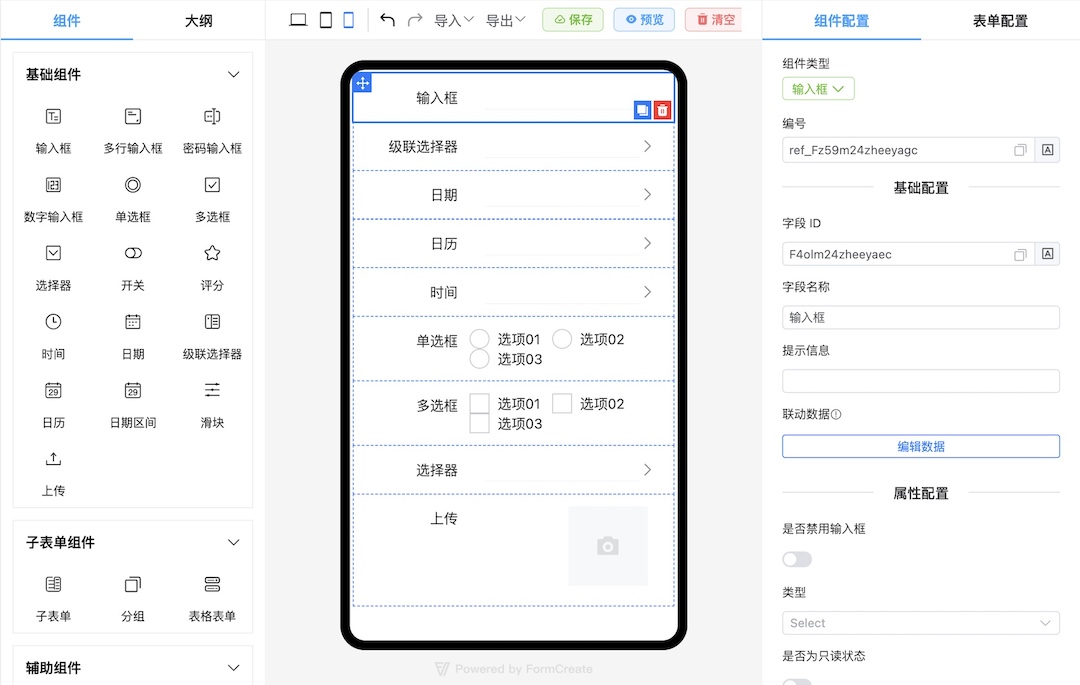
FcDesigner Vant is a mobile low-code visual form designer for Vue 3. Build forms quickly with drag-and-drop to boost productivity and save time.
Built on Vue 3.0 and ElementPlus for mobile pages. Uses Vant 4.0 with built-in multi-language support, extensible architecture, and custom component capabilities.
Note
- The mobile designer has the same functionality and configuration as the PC designer, only component names differ
- When reading documentation, replace
fc-designerandform-createwithfc-designer-mobileandform-create-mobile - PC uses
@form-create/element-uifor rendering, mobile uses@form-create/vant
Note
form-create version needs to be >= 3.2.14
Installation
Install @form-create/vant-designer:
sh
npm install @form-create/vant-designer@^3
npm install @form-create/element-ui@^3
npm install @form-create/vant@^3
npm install element-plus
npm install vant
To update existing renderer installations:
shell
npm update @form-create/element-ui@^3
npm update @form-create/vant@^3
Import
Node.js Import
For Node.js projects, import and configure in your Vue 3 project:
js
import FcDesignerMobile from '@form-create/vant-designer'
import ELEMENT from 'element-plus';
import vant from 'vant';
import 'vant/lib/index.css';
import 'element-plus/dist/index.css';
// Create Vue application
const app = createApp(App);
app.use(ELEMENT)
app.use(vant)
app.use(FcDesignerMobile)
app.use(FcDesignerMobile.formCreate)
// Mount application
app.mount('#app');
CDN Import
To use CDN, import dependencies in your HTML file:
html
<link rel="stylesheet" href="https://unpkg.com/element-plus/dist/index.css"></link>
<link rel="stylesheet" href="https://unpkg.com/vant@4/lib/index.css"/>
<script src="https://unpkg.com/vue"></script>
<script src="https://unpkg.com/element-plus/dist/index.full.js"></script>
<script src="https://unpkg.com/vant@4/lib/vant.min.js"></script>
<script src="https://unpkg.com/@form-create/element-ui@next/dist/form-create.min.js"></script>
<script src="https://unpkg.com/@form-create/vant@next/dist/form-create.min.js"></script>
<script src="https://unpkg.com/@form-create/vant-designer@next/dist/index.umd.js"></script>
<div id="app">
    <fc-designer-mobile height="100vh"></fc-designer-mobile>
</div>
<script>
    const { createApp } = Vue;
    const app = createApp({});
    app.use(ElementPlus);
    app.use(vant);
    app.use(FcDesignerMobile);
    app.use(FcDesignerMobile.formCreate);
    app.mount('#app');
</script>
Usage
Use the fc-designer-mobile component in Vue 3 components:
vue
<template>
    <fc-designer-mobile ref="designer" height="100vh" />
</template>
<script setup>
    import { ref } from 'vue';
    // You can get the designer instance or perform other operations here
    const designer = ref(null);
</script>