


Component Type Switching
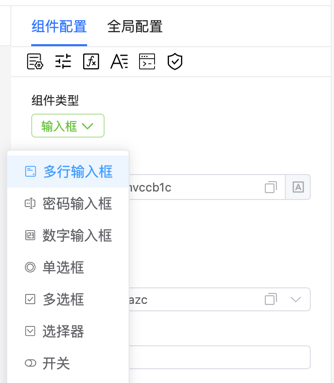
Configure switchType to restrict or allow switching rules between components, enhancing the designer's flexibility and controllability. This configuration helps you customize component switching behavior to match business requirements.
Data Structure
ts
// Whether component types can be switched, or fields that can be switched to each other
type SwitchType = false | Array<string[]>;
Configure custom component switching rules. Can be false (disable component switching functionality) or an array, where each sub-array defines a group of component types that can be switched to each other.
Basic Example
Allow switching between input, textarea, select, and radio
vue
<template>
    <fc-designer ref="designer" :config="config"/>
</template>
<script setup>
    const config = {
        switchType: [
            ['input', 'textarea', 'select', 'radio']
        ]
    }
</script>
Switch Under Specific Conditions
Only allow certain fields to switch under specific conditions. For example, when users select a specific form type, allow switching of specific components:
vue
<template>
    <fc-designer ref="designer" :config="config"/>
</template>
<script setup>
    const config = ref({
        switchType: [
            ['input', 'textarea'],
        ]
    })
    function onConditionChange(condition) {
        if (condition) {
            config.value.switchType = [
                ['select', 'radio']
            ];
        }
    }
</script>