


Component Configuration Item Visibility
Use config.hiddenItemConfig and config.disabledItemConfig to control the visibility and disabled state of configuration items in the designer. These configurations help you manage the designer's interface more precisely to align with business requirements.
Data Structure
ts
type Config = {
    // Hide some component configuration items
    hiddenItemConfig?: {
        // Hide specified configuration for all components
        default?: string[];
        // Drag rule name: hidden field names
        [id: string]: string[];
    };
    // Disable some component configuration items
    disabledItemConfig?: {
        // Disable specified configuration for all components
        default?: string[];
        // Drag rule name: disabled field names
        [id: string]: string[];
    };
}
Hide Specified Configuration Items
Use hiddenItemConfig to hide specified configuration items in the right-side configuration panel. For example, hide the disabled configuration item for all components and the field configuration item for input components:
vue
<template>
    <fc-designer ref="designer" :config="config"/>
</template>
<script setup>
    const config = {
        hiddenItemConfig: {
            default: ['disabled'],
            input: ['field']
        },
    }
</script>
Disable Specified Configuration Items
Use disabledItemConfig to disable specified configuration items in the right-side configuration panel. For example, disable the disabled configuration item for all components and the field configuration item for input components:
vue
<template>
    <fc-designer ref="designer" :config="config"/>
</template>
<script setup>
    const config = {
        disabledItemConfig: {
            default: ['disabled'],
            input: ['field']
        },
    }
</script>
Form Component Basic Configuration Field Names
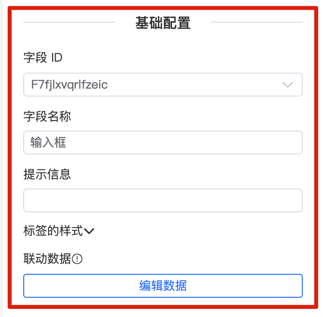
| Configuration Item | Field ID |
|---|---|
| Field ID | field |
| Field Name | title |
| Hint Information | info |
| Component Width | formCreateCol>span |
| Ignore Field | ignoreConfig |
| Configure Form Item | labelConfig |
| Data Linkage | control |