


Form i18n
The designer provides multi-language support, allowing one-click language switching in forms. Essential for modern business applications, especially internationalized products.
Configure Multi-language Data in Designer
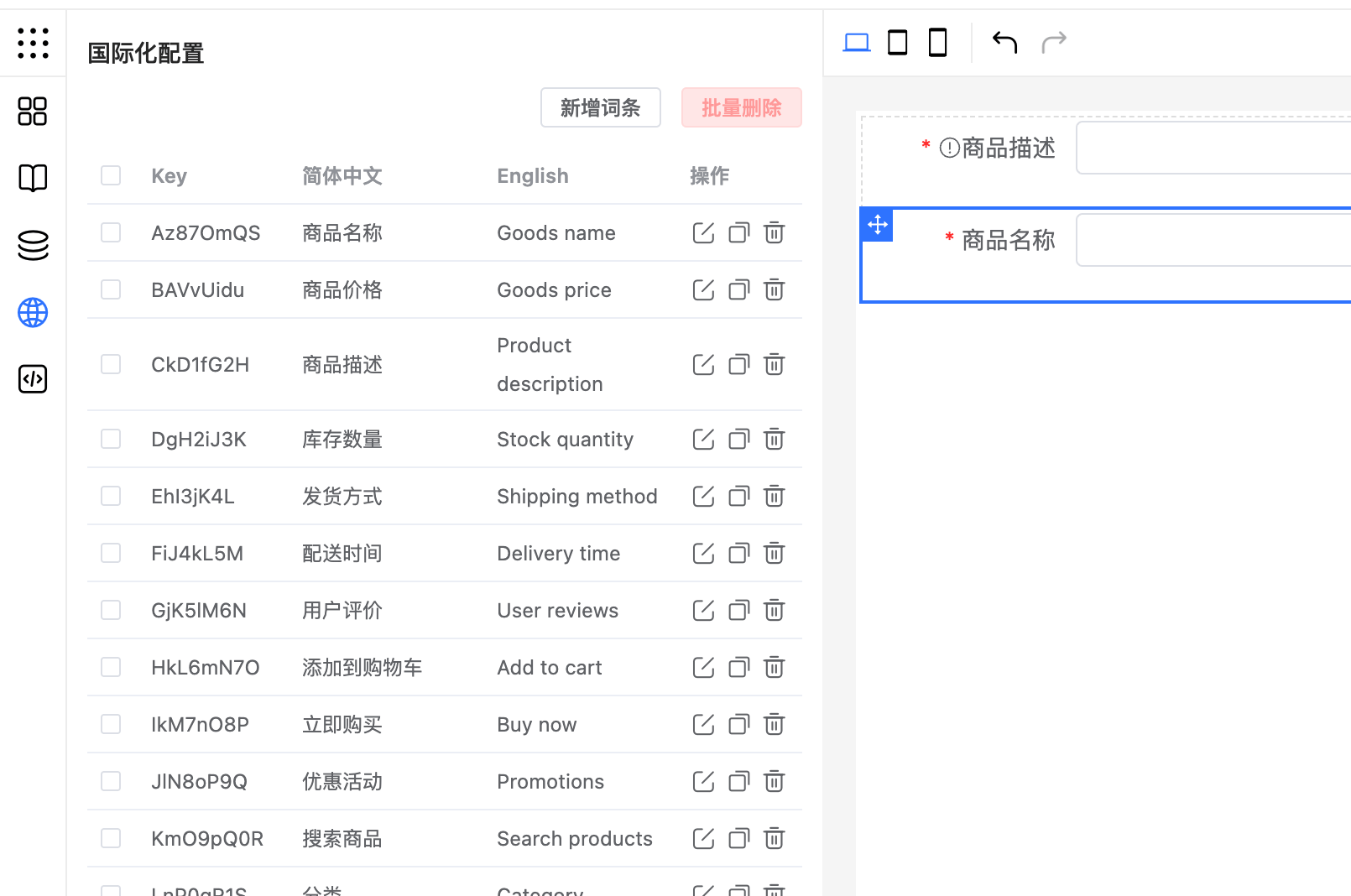
Use the config.localeOptions configuration option to define multi-language options. By default, the designer provides Simplified Chinese and English support. Default configuration:
{
    config: {
        localeOptions: [
            { value: 'zh-cn', label: 'Simplified Chinese' },
            { value: 'en', label: 'English' },
        ],
    }
}
Customize Multi-language Options
To add other languages, such as Traditional Chinese, modify localeOptions:
{
    config: {
        localeOptions: [
            {value: 'zh-cn', label: 'Simplified Chinese'},
            {value: 'zh-tw', label: 'Traditional Chinese'},
        ],
    }
}
Predefined Multi-language Data
Manage multi-language data through form configuration options.language:
<template>
    <fc-designer ref="designer"></fc-designer>
</template>
<script>
    const designer = ref(null);
    onMounted(() => {
        designer.value.setOption({
            // Other form configurations
            //...
            language: {
                "zh-cn": {
                    "Az87OmQS": "Product Name",
                    "BAVvUidu": "Product Price",
                    "CkD1fG2H": "Product Description",
                    "DgH2iJ3K": "Stock Quantity",
                    "EhI3jK4L": "Shipping Method",
                    "FiJ4kL5M": "Delivery Time",
                    "GjK5lM6N": "User Reviews",
                },
                "en": {
                    "Az87OmQS": "Goods name",
                    "BAVvUidu": "Goods price",
                    "CkD1fG2H": "Product description",
                    "DgH2iJ3K": "Stock quantity",
                    "EhI3jK4L": "Shipping method",
                    "FiJ4kL5M": "Delivery time",
                    "GjK5lM6N": "User reviews",
                    "HkL6mN7O": "Add to cart",
                }
            }
        });
    });
</script>
Options Support Multi-language
Combine global variables (storing language packs) and bound variables (dynamically switching options) to achieve multi-language support for options:
function handle(get, api) {
    // $locale can get the current language
    if(get('$locale') === 'en') {
        return [
            {label: 'Apple' , value: 'Apple'},
            {label: 'Watermelon' , value: 'Watermelon'}
            {label: 'Pear' , value: 'Pear'}
        ]
    } else {
        return [
            {label: 'Apple' , value: 'Apple'},
            {label: 'Watermelon' , value: 'Watermelon'}
            {label: 'Pear' , value: 'Pear'}
        ]
    }
}
Using Multi-language
Basic Usage
In component field names, hint information, and validation messages, directly use multi-language variables. For example: {{$t.DgH2iJ3K}}
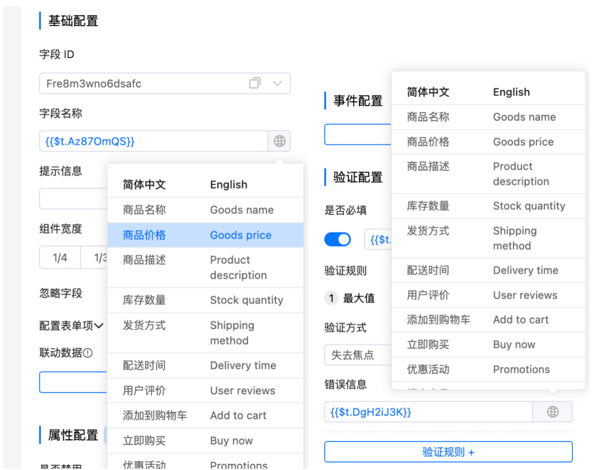
With this configuration, when users switch between different languages, the text displayed in the form automatically updates to the corresponding language.
Using Multi-language in Component Configuration
When using multi-language in component configuration, use bound variables:
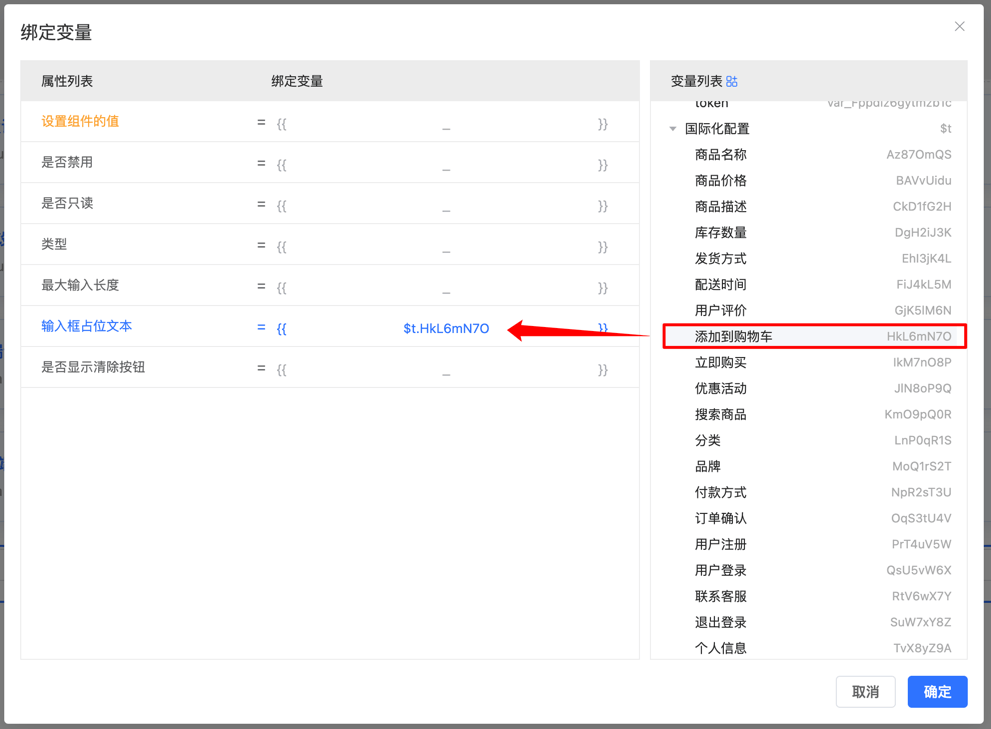
Using Multi-language in Functions
To get specific multi-language text in functions or events, use the api.t('DgH2iJ3K') method to get the corresponding content:
handleEvent($inject) {
    const message = $inject.api.t('submitSuccessMessage');
    console.log(message);
}
Get Current Language
In some scenarios, you may need to use the currently used language in interfaces. Get the current language code through the {{$locale}} variable:
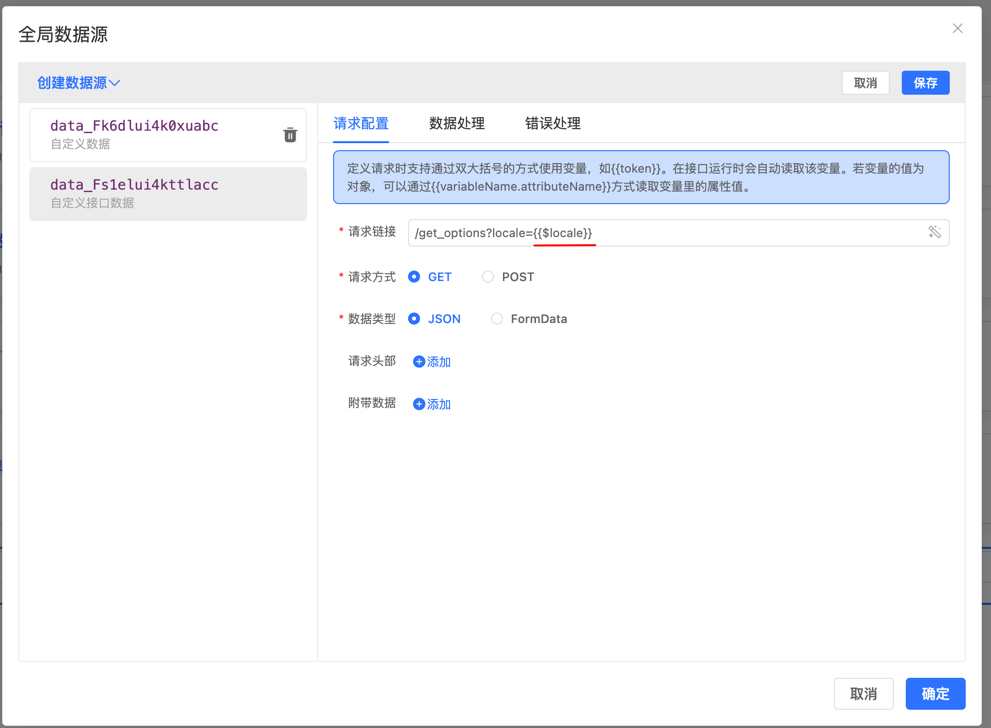
Get in events:
handleEvent($inject) {
    const locale = $inject.api.getData('$locale');
    console.log(locale);
}
Get Component Label Name in Validation Rules
In validation prompts, automatically replace {title} with the label name to provide more contextual prompt information:
Please enter {title}These features let developers easily integrate multi-language support, making forms provide a good user experience in different language environments.