FAQ
This document collects common issues users encounter when using the form designer, providing quick solutions and usage recommendations.
Page Styling Issues/Functionality Not Working
Problem Analysis: If page styling is broken or buttons don't respond to clicks, it's usually because certain UI components weren't mounted correctly.
Solution:
- Check Console Warnings: Open your browser's developer tools and check the console output. If you see yellow warnings like
"[Vue warn]: Failed to resolve component el-button", it means a component wasn't mounted.
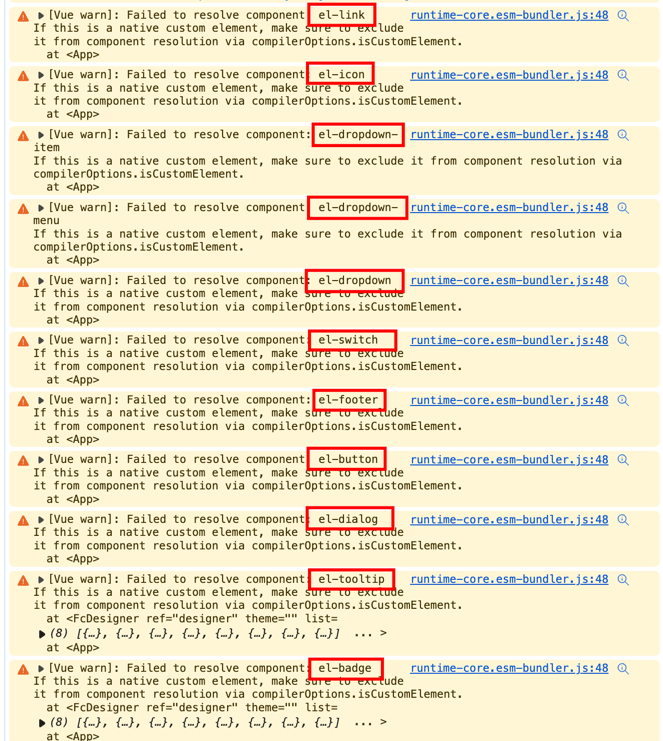
- Mount Missing Components: Import and mount the missing components in
main.js. For example:
// Import the unmounted component
import { ElBadge } from 'element-plus';

const app = createApp(App);
// Mount the component - there are two ways
app.use(ElBadge);
// or
app.component(ElBadge.name, ElBadge);
Following these steps, you can effectively resolve issues caused by unmounted UI components and restore normal page functionality and styling.
Manually Trigger Form Submission
Sometimes you may need to manually trigger form submission in an event. Follow these steps:
Solution:
Trigger form submission by calling the api.submit method (it will only execute after passing form validation):
api.submit()Determine Whether a Component is Rendered in Designer or Renderer Environment
Solution:
Determine the environment by injecting designer in the component.
<script>
    import {defineComponent} from 'vue';
    export default defineComponent({
        name: 'FieldList',
        inject: ['designer'],
        methods: {
            nodeClick(node) {
                 if(this.designer) {
                     // Designer environment
                 } else {
                     // Renderer environment
                 }
            }
        }
    });
</script>
Get the Currently Selected Rule in the Designer from a Component
Solution:
Get the designer instance by injecting designer in the component. Access the currently selected rule and other information through the instance:
<template>
    <input type="text" v-model="title" @change="onChange">
</template>
<script>
    import {defineComponent} from 'vue';
    export default defineComponent({
        name: 'FieldList',
        inject: ['designer'],
        data() {
            return {
                title: ''
            }
        },
        computed: {
            activeRule() {
                return this.designer.setupState.activeRule;
                //return this.designer.activeRule; (vue2)
            }
        },
        methods: {
            onChange() {
                // Directly modify the currently selected rule
                 this.activeRule.title = this.title;
            }
        }
    });
</script>
Console Warning Message
Please use FormCreate version 3.2.18 or greater, see https://github.com/xaboy/form-create.
Solution:
This issue is caused by an outdated formCreate renderer version. Upgrading to the latest version will resolve it. For the element-ui version:
npm update @form-create/element-uiYou can also check the commands in Getting Started
Functions in Rules Being Compiled
Problem Description: When using regular function definitions (like function (get, api) { ... }) in form rules, these functions may be compiled or optimized during project bundling, causing saved rules to fail to execute properly.
Solution:
Use the new Function() constructor instead of regular function definitions. This prevents functions from being compiled during project bundling and ensures they can be serialized and executed correctly.
Not Recommended (may be compiled):
function (get, api) {
    return get('$cookie.token') || 'default Token';
}
Recommended (using new Function):
new Function('get', 'api', "return get('$cookie.token') || 'default Token'")Usage Examples
1. Using in Global Variables:
designer.value.setGlobalVariable({
  "var_Fppdlz6gytmzb1c": {
    label: "token",
    deletable: false,
    handle: new Function('get', 'api', "return get('$cookie.token') || 'default Token'")
  }
});
2. Using in Event Handlers:
{
  type: 'button',
  field: 'submitBtn',
  title: '提交',
  on: {
    click: new Function('$inject', `
      const api = $inject.api;
      const formData = api.formData();
      console.log('表单数据:', formData);
    `)
  }
}
3. Using in Computed Properties:
{
  type: 'input',
  field: 'total',
  title: '总价',
  value: new Function('get', 'api', `
    const quantity = get('$form.quantity') || 0;
    const price = get('$form.price') || 0;
    return quantity * price;
  `)
}
4. Using in Data Parsing Functions:
designer.value.setGlobalData({
  "data_Fs1elui4kttlacc": {
    action: "http://192.168.1.4:8081/",
    method: "GET",
    label: "自定义接口数据",
    type: "fetch",
    parse: new Function('res', 'return res.data;')
  }
});
Notes
- String Format: The last parameter of
new Function()is the function body string. Pay attention to quote escaping in the string. - Parameter Order: The parameter order for
new Function()is: parameter1, parameter2, ..., function body - Code Readability: Although
new Function()can avoid compilation issues, code readability is poor. It's recommended to document the function's purpose in comments. - Error Handling: Add appropriate error handling logic in the function body string.
Form Reactivity Lost/Assignment Failed
Solution:
<template>
    <form-create v-if="rule.length" v-model="formData" v-model:api="fApi" @submit="handleSubmit" :rule="rule"
                 :option="option"></form-create>
</template>rule,formData,optionsmust be wrapped withrefor defined in thedataobject.Add
v-if="rule.length"to the<form-create/>tag to ensure the form is rendered with the latest rules.rulecannot be reused. If used in a modal, deep copy the original rule when the modal opens.When modifying form data through
api, wrap theapi.setValuemethod in thenextTickmethod.
Form/Component Events Not Executing or Throwing Errors
Solution:
You must use formCreate.parseJson instead of JSON.parse, and formCreate.toJson instead of JSON.stringify to convert JSON data, ensuring the data format is correct.
Form Lifecycle Events Not Triggering
Problem Description: When instantiating a form, you may find that lifecycle events (such as onMounted, onCreated) are not triggering as expected.
Solution:
This issue usually occurs when the FormCreate component has already completed initialization by the time options is assigned. To resolve this, use the following strategy:
Use v-if to Control Rendering: Add a v-if condition to the form-create tag to ensure the form is rendered only after all data is ready.
For example:
<form-create v-if="isReady" :rule="rule" :option="option"></form-create>Set isReady to false initially, then set it to true after configuration is complete and ready. This ensures the form component reinitializes at the appropriate time and correctly triggers lifecycle events.
Operating Data in the Same Row in Table Forms
Problem Background: In complex forms, you may need to operate on form data in the same row, such as updating or getting single-row data. FormCreate provides methods to achieve this.
Solution:
FormCreate provides a series of methods to easily get and modify component rules and data in the same row:
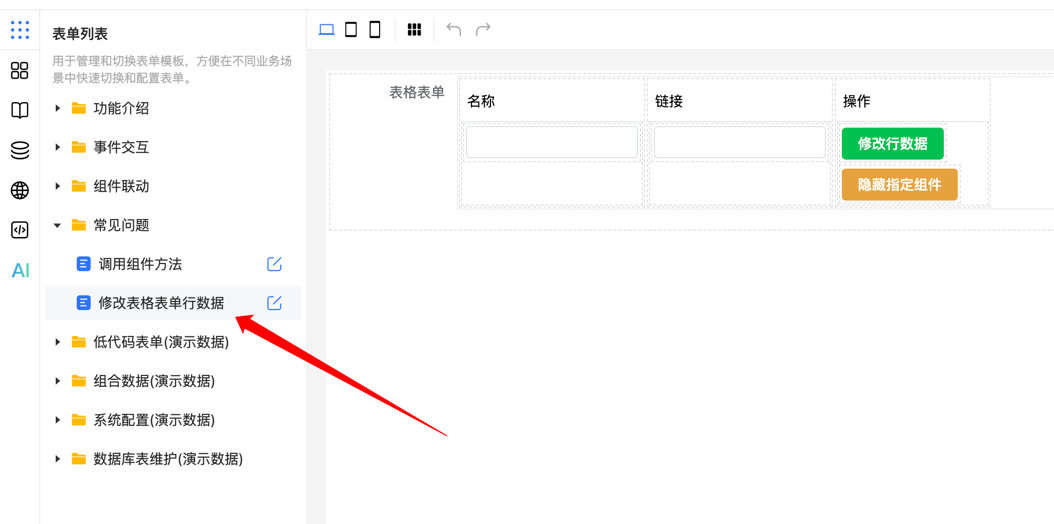
getParentSubRule: Get the child component rule of the parent rule.getChildrenRuleList: Get the list of child component rules.getChildrenFormData: Get the form data of child components.setChildrenFormData: Set the form data of child components.
Online Example Demo:
View detailed usage cases at the Online Example Link site to help you better understand and apply these methods in actual development.