


Options Configuration Rules
Learn how to configure option data for components (such as transfer boxes, tree selectors, etc.), including two common forms: regular lists and tree structures. Use the built-in makeOptionsRule and makeTreeOptionsRule methods to quickly generate standardized option configuration rules.
Regular Options Configuration
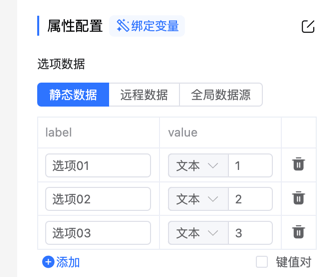
Configuration Steps
Determine the property that receives options
Check the component documentation to confirm the property name that receives options, such as theelTransfercomponent receiving options throughprops.data.Use the
makeOptionsRulemethod
This method generates configuration rules for regular options.
Note
The to parameter must correspond to the props field where the component receives options. For example, when the component receives through props.data, you need to pass "props.data".
Code Example
import uniqueId from '@form-create/utils/lib/unique';
import {makeOptionsRule} from '@form-create/designer';

const label = 'Transfer Box';
const name = 'elTransfer';

export default {
    // Component basic configuration
    menu: 'main',
    icon: 'icon-transfer',
    label,
    name,
    input: true,
    event: ['change', 'leftCheckChange', 'rightCheckChange'],
    validate: ['array'],
    // Default rule configuration
    rule({t}) {
        return {
            type: name,
            field: uniqueId(),
            title: 'Transfer Box',
            info: '',
            $required: false,
            props: {
                // Initial data
                data: [
                    {label: "Option 01", value: "1"},
                    {label: "Option 02", value: "2"},
                    {label: "Option 03", value: "3"}
                ]
            }
        };
    },
    // Property configuration
    props(_, {t}) {
        return [
            // Generate options configuration rule
            makeOptionsRule(t, 'props.data', 'label', 'value'),
            {
                type: 'switch',
                title: 'Searchable',
                field: 'filterable'
            }
        ];
    }
};
Data Structure
/**
 * Generate regular options configuration rule
 * @param t Internationalization function
 * @param to Option data storage location (e.g., 'props.data')
 * @param label Label field name (default 'label')
 * @param value Value field name (default 'value')
 * @returns Generated configuration rule array
 */
makeOptionsRule(t: T, to: string, label?: string, value?: string): Rule[];
Tree Options Configuration
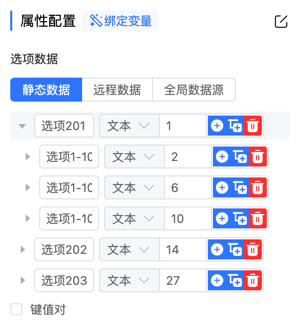
Configuration Steps
Determine the property that receives options
For example, theelTreeSelectcomponent receives tree options throughprops.data.Use the
makeTreeOptionsRulemethod
A configuration method designed specifically for tree structure options.
Note
The to parameter must correspond to the props field where the component receives options. For example, when the component receives through props.data, you need to pass "props.data".
Code Example
import uniqueId from '@form-create/utils/lib/unique';
import {makeTreeOptionsRule} from '@form-create/designer';

const label = 'Tree Select';
const name = 'elTreeSelect';

export default {
    // Component basic configuration
    menu: 'main',
    icon: 'icon-tree-select',
    label,
    name,
    input: true,
    event: ['change', 'visibleChange', 'removeTag', 'clear', 'blur', 'focus'],
    validate: ['string', 'number', 'array'],
    // Default rule configuration
    rule({t}) {
        return {
            type: name,
            field: uniqueId(),
            title: 'Tree Select',
            info: '',
            $required: false,
            props: {
                nodeKey: 'value',
                showCheckbox: true,
                // Initial data
                data: [
                    {
                        label: "Option 201",
                        value: "1",
                        children: [
                            {label: "Option 1-101", value: "2"}
                        ]
                    }
                ]
            }
        };
    },
    // Property configuration
    props(_, {t}) {
        return [
            // Generate tree options configuration rule
            makeTreeOptionsRule(t, 'props.data', 'label', 'value'),
            {type: 'switch', title: 'Multiple Selection', field: 'multiple'}
        ];
    }
};
Data Structure
/**
 * Generate tree options configuration rule
 * @param t Internationalization function
 * @param to Option data storage location
 * @param label Label field name (default 'label')
 * @param value Value field name (default 'value')
 * @returns Generated configuration rule array
 */
makeTreeOptionsRule(t: T, to: string, label?: string, value?: string): Rule[];
Notes
- Field name parameters (label/value) must be consistent with the actual data structure.